
Browser-Based Remote Desktop Streaming
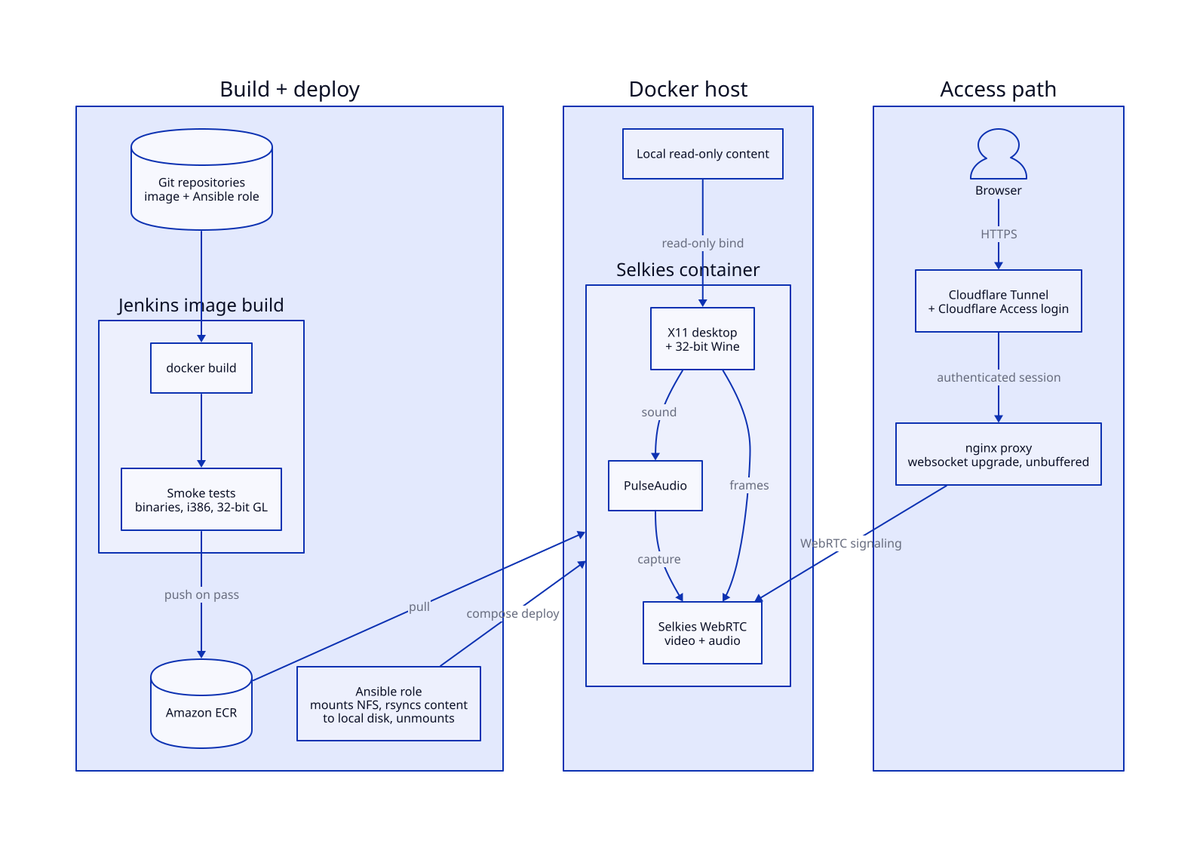
A Jenkins-built, Ansible-deployed desktop container streams video and audio over WebRTC through an nginx proxy and an authenticated Cloudflare tunnel.
The Challenge
The goal was an interactive Linux desktop, including support for legacy 32-bit Windows applications, that could be reached from any browser with low-latency video and synchronized sound, and that was safe to expose beyond the home network. Traditional remote-desktop tools fall short here: VNC has no audio channel, and bolting audio on beside it produces two streams that drift out of sync.
Running a GPU-less container as a workstation also produced subtle failures. One application received keyboard events and then discarded them, and no application produced sound, even though every diagnostic run as root reported a healthy audio server.
The Solution
The workload runs in a container built on Selkies, which streams the desktop and its audio together over WebRTC. The image adds 32-bit Wine with software OpenGL, Jenkins builds, smoke-tests and publishes it to a private registry, and Ansible deploys it with read-only content, a separate writable state volume and no runtime dependency on network storage.
nginx handles the websocket upgrade and unbuffered streaming. The public entry point runs through a Cloudflare Tunnel protected by Cloudflare Access, so no inbound port is opened and every session requires an authenticated login.
Implementation Details
The work followed the standard delivery path: the image in Git, a Jenkins build with gating smoke tests, and an Ansible role for deployment and proxy configuration.
- Image: a Selkies desktop base with i386 multi-architecture support, 32-bit Wine, 32-bit Mesa OpenGL and pre-fetched runtime libraries, so nothing is downloaded at run time.
- Smoke tests: the build fails if a required binary, the i386 architecture, the 32-bit GL library or a runtime plugin is missing, catching images that would otherwise publish cleanly and then fail quietly in use.
- Credential hygiene: the registry login runs in a throwaway AWS CLI container with keys passed through the environment, so they never appear in process arguments.
- Deployment: at deploy time the role mounts the network archive read-only, syncs content to local disk and unmounts it. The container runs with
no-new-privileges, read-only content volumes and a pinned session resolution. - Proxying: nginx virtual hosts enable the websocket upgrade and disable buffering with long timeouts, and the internal and zero-trust public entry points share one template.
- Keyboard fault: an application ignored every key press under its OpenGL video driver on software rendering. Tracing events on the target window and querying the X keymap showed the keys arriving and being dropped, and changing input drivers made no difference. Pinning the video driver to SDL2, with input read from X because keystrokes arrive over XTEST, fixed it, and the setting lives in a configuration overlay that survives the application rewriting its own settings.
- Audio fault: two problems were stacked. The PulseAudio socket's directory was not traversable by the service user, which libpulse reports as "connection refused" and which looks healthy when tested as root; connecting as the service user proved it. Separately, the streaming process, started by the s6 supervisor rather than the desktop session, never received
PULSE_SERVER. Fixes landed in both the image and the Compose template and were verified on a freshly started container.